“The 22 Psychological Triggers That Make Women Chase You… Starting Tonight”

Forget the cash, the cars, and the chiseled jawlines. Female desire operates on a completely different frequency. Primal. Subconscious. Triggers that bypass her logic and hit her on a gut level. Most guys are totally blind to them.

I know because I was one of them. The overthinking. The paralysis. The silent drive home kicking yourself for freezing up. Watching average guys walk away with the girl while you stood there stuck in your own head.

Then I decoded the psychology behind what actually makes women tick. 22 hard rules.  Subtle behavioral shifts that rewired my entire reality. The anxiety evaporated. Women started leaning in. Investing. Chasing.

Read more...

Anybody here good with Google Docs?

BPH

Master Don Juan
Joined
Nov 8, 2010
Messages
3,750
Reaction score
2,705
Location
Wilmington, DE
I'm trying to design a document in multiple formats (Letter, A4, A5, Half-Letter), but when I change the page setup size to accommodate those other formats it resizes the document, but not its contents.

Font size, table size, etc aren't locked and scaled to fit similarly on the new document and end up on different lines and different pages.

Is there a way to "lock the aspect ratio" when it comes to the content within a document that you're changing?
 

BPH

Master Don Juan
Joined
Nov 8, 2010
Messages
3,750
Reaction score
2,705
Location
Wilmington, DE


;)
Did you look at the results of the search before you posted this? I obviously did a search first...

I'm not looking to lock the aspect ratio of an IMAGE...I'm looking to maintain the aspect ratio of ALL CONTENT within a document once I change the page size...that means tables, fonts, sentences, spacing, etc.

I don't want to change the page size and have half of what I wrote end up on a 2nd page, for example.

I don't see a way to do that online through Google Docs so far, just a lot of external software suggestions from dozens of random companies.
 

sharkfinale

Don Juan
Joined
Dec 7, 2022
Messages
128
Reaction score
112
Age
36
I think that'll be forte of design tools than docs. Try Canva.
 

Chow Mein

Senior Don Juan
Joined
Jun 9, 2024
Messages
390
Reaction score
273
Did you look at the results of the search before you posted this? I obviously did a search first...

I'm not looking to lock the aspect ratio of an IMAGE...I'm looking to maintain the aspect ratio of ALL CONTENT within a document once I change the page size...that means tables, fonts, sentences, spacing, etc.

I don't want to change the page size and have half of what I wrote end up on a 2nd page, for example.

I don't see a way to do that online through Google Docs so far, just a lot of external software suggestions from dozens of random companies.
Why ask on here then?
 

What happens, IN HER MIND, is that she comes to see you as WORTHLESS simply because she hasn't had to INVEST anything in you in order to get you or to keep you.

You were an interesting diversion while she had nothing else to do. But now that someone a little more valuable has come along, someone who expects her to treat him very well, she'll have no problem at all dropping you or demoting you to lowly "friendship" status.

Quote taken from The SoSuave Guide to Women and Dating, which you can read for FREE.

BPH

Master Don Juan
Joined
Nov 8, 2010
Messages
3,750
Reaction score
2,705
Location
Wilmington, DE
I think that'll be forte of design tools than docs. Try Canva.
Played around with it a bit, and while I can create custom resizes and "lock aspect ratio" it doesn't seem to maintain the size of the content. Maybe it would apply correctly if I built it inside of Canva rather than uploading the Google Doc, so I can try that tomorrow.

Why ask on here then?
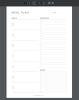
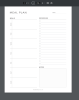
Because I'm hoping somebody on here knows something I don't/more than a Google search. Below are example images from the competition in Letter and A4 sizes. Notice how despite the pages being different sizes, the content ON the page are spaced the same in both images. I don't know how to achieve that result.

a4example.png letterexample.png
 
Top