"I just moved here from Florida."

That sentence contains at least five follow-up questions she WANTS you to ask. Where in Florida? What brought you here? How long have you been in the area? What do you miss? How does it compare to here?

She handed them to you on a silver platter. And you said, "Oh cool. I come here every week. I love this band. Ummm... pretty crowded tonight."

She smiled politely. Nodded. And never texted you back.

I was that guy for years. Talking too much. Listening too little. Panicking about my next sentence while she was literally feeding me the answers.

Then I found 22 rules that fixed the whole thing. Rule number one: shut up and listen. She'll tell you exactly what to say.

Read more...

Anybody here good with Google Docs?

BPH

Master Don Juan
Joined
Nov 8, 2010
Messages
3,916
Reaction score
3,024
Location
Wilmington, DE
I'm trying to design a document in multiple formats (Letter, A4, A5, Half-Letter), but when I change the page setup size to accommodate those other formats it resizes the document, but not its contents.

Font size, table size, etc aren't locked and scaled to fit similarly on the new document and end up on different lines and different pages.

Is there a way to "lock the aspect ratio" when it comes to the content within a document that you're changing?
 

"I just moved here from Florida."

That sentence contains at least five follow-up questions she WANTS you to ask. Where in Florida? What brought you here? How long have you been in the area? What do you miss? How does it compare to here?

She handed them to you on a silver platter. And you said, "Oh cool. I come here every week. I love this band. Ummm... pretty crowded tonight."

She smiled politely. Nodded. And never texted you back.

I was that guy for years. Talking too much. Listening too little. Panicking about my next sentence while she was literally feeding me the answers.

Then I found 22 rules that fixed the whole thing. Rule number one: shut up and listen. She'll tell you exactly what to say.

Read more...

BPH

Master Don Juan
Joined
Nov 8, 2010
Messages
3,916
Reaction score
3,024
Location
Wilmington, DE


;)
Did you look at the results of the search before you posted this? I obviously did a search first...

I'm not looking to lock the aspect ratio of an IMAGE...I'm looking to maintain the aspect ratio of ALL CONTENT within a document once I change the page size...that means tables, fonts, sentences, spacing, etc.

I don't want to change the page size and have half of what I wrote end up on a 2nd page, for example.

I don't see a way to do that online through Google Docs so far, just a lot of external software suggestions from dozens of random companies.
 

sharkfinale

Don Juan
Joined
Dec 7, 2022
Messages
128
Reaction score
112
Age
36
I think that'll be forte of design tools than docs. Try Canva.
 

Chow Mein

Senior Don Juan
Joined
Jun 9, 2024
Messages
390
Reaction score
273
Did you look at the results of the search before you posted this? I obviously did a search first...

I'm not looking to lock the aspect ratio of an IMAGE...I'm looking to maintain the aspect ratio of ALL CONTENT within a document once I change the page size...that means tables, fonts, sentences, spacing, etc.

I don't want to change the page size and have half of what I wrote end up on a 2nd page, for example.

I don't see a way to do that online through Google Docs so far, just a lot of external software suggestions from dozens of random companies.
Why ask on here then?
 

"You Can't Argue a Woman Into Liking You"

You made your case like a lawyer. Stable job. Good guy. Ready for something real. All true. All irrelevant.

She weighed your points, nodded along, felt nothing — then fell hard for some tattooed bartender with a motorcycle and a gambling problem.

Logic is where attraction goes to die. The "22 Rules" work a level deeper, on the subconscious switches that decide within minutes whether you register as a MAN or as part of the furniture.

Stop presenting evidence. Start flipping switches.

Read more...

BPH

Master Don Juan
Joined
Nov 8, 2010
Messages
3,916
Reaction score
3,024
Location
Wilmington, DE
I think that'll be forte of design tools than docs. Try Canva.
Played around with it a bit, and while I can create custom resizes and "lock aspect ratio" it doesn't seem to maintain the size of the content. Maybe it would apply correctly if I built it inside of Canva rather than uploading the Google Doc, so I can try that tomorrow.

Why ask on here then?
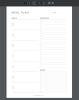
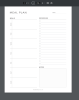
Because I'm hoping somebody on here knows something I don't/more than a Google search. Below are example images from the competition in Letter and A4 sizes. Notice how despite the pages being different sizes, the content ON the page are spaced the same in both images. I don't know how to achieve that result.

a4example.png letterexample.png
 
Top