"I'm Not Looking for Anything Serious Right Now"

When a woman says it, guys hear a confession. A heads-up. A scheduling conflict.

Here's the translation: I don't feel anything. Right now. With you.

Watch what happens when a man triggers actual attraction. The busy career, the recent breakup, the "not in a place to date" — all of it evaporates instantly. The same woman who was guarding her freedom is suddenly free every night.

The "22 Rules" explain why. When the right switches flip, her timeline rearranges itself around you.

Read more...

Anybody here good with Google Docs?

BPH

Master Don Juan
Joined
Nov 8, 2010
Messages
3,916
Reaction score
3,024
Location
Wilmington, DE
I'm trying to design a document in multiple formats (Letter, A4, A5, Half-Letter), but when I change the page setup size to accommodate those other formats it resizes the document, but not its contents.

Font size, table size, etc aren't locked and scaled to fit similarly on the new document and end up on different lines and different pages.

Is there a way to "lock the aspect ratio" when it comes to the content within a document that you're changing?
 

"Nervous Around Beautiful Women? There's a Rule for That"

I could talk to any woman I wasn't attracted to. Charming, funny, relaxed. Then a gorgeous woman looked my way and I'd become a sweating, babbling mess.

The fix took me years to find and ten minutes to learn. Nervousness and excitement are the same physical state — pounding heart, adrenaline, flushed face. Your brain just picks the label. And you can pick a better one.

Rule 16 shows you how. You feel the nerves, relabel them as excitement, and let that energy pour out as enthusiasm. Women notice the guy radiating it. They always do.

Read more...

BPH

Master Don Juan
Joined
Nov 8, 2010
Messages
3,916
Reaction score
3,024
Location
Wilmington, DE


;)
Did you look at the results of the search before you posted this? I obviously did a search first...

I'm not looking to lock the aspect ratio of an IMAGE...I'm looking to maintain the aspect ratio of ALL CONTENT within a document once I change the page size...that means tables, fonts, sentences, spacing, etc.

I don't want to change the page size and have half of what I wrote end up on a 2nd page, for example.

I don't see a way to do that online through Google Docs so far, just a lot of external software suggestions from dozens of random companies.
 

sharkfinale

Don Juan
Joined
Dec 7, 2022
Messages
128
Reaction score
112
Age
36
I think that'll be forte of design tools than docs. Try Canva.
 

Chow Mein

Senior Don Juan
Joined
Jun 9, 2024
Messages
390
Reaction score
273
Did you look at the results of the search before you posted this? I obviously did a search first...

I'm not looking to lock the aspect ratio of an IMAGE...I'm looking to maintain the aspect ratio of ALL CONTENT within a document once I change the page size...that means tables, fonts, sentences, spacing, etc.

I don't want to change the page size and have half of what I wrote end up on a 2nd page, for example.

I don't see a way to do that online through Google Docs so far, just a lot of external software suggestions from dozens of random companies.
Why ask on here then?
 

"She's Out of Your League"

You've said it a hundred times. Maybe a thousand. And every time you say it, you train your brain to freeze the next time she walks into the room.

Leagues are a myth invented by guys who are scared of women.

She's a person. She has bad breath in the morning. She picks songs she can't sing in the shower. She overthinks her own texts.

Walk over. Say something. The league dissolves the second you open your mouth.

Read more...

BPH

Master Don Juan
Joined
Nov 8, 2010
Messages
3,916
Reaction score
3,024
Location
Wilmington, DE
I think that'll be forte of design tools than docs. Try Canva.
Played around with it a bit, and while I can create custom resizes and "lock aspect ratio" it doesn't seem to maintain the size of the content. Maybe it would apply correctly if I built it inside of Canva rather than uploading the Google Doc, so I can try that tomorrow.

Why ask on here then?
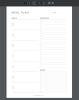
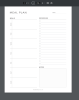
Because I'm hoping somebody on here knows something I don't/more than a Google search. Below are example images from the competition in Letter and A4 sizes. Notice how despite the pages being different sizes, the content ON the page are spaced the same in both images. I don't know how to achieve that result.

a4example.png letterexample.png
 
Top